Saint Mary’s University and Apple Computers will once again offer a one day electronic recycling program to its employees on Thursday, August 12th. The program is free of charge.
Bring your equipment to the drop off point located behind the gates of the Kulas-Connaughty Power Plant between the hours of 8:30AM and 4:00PM on Thursday, August 12th.
We will accept:
Cpu, monitor, printer, fax machine, television, scanner, cd drive, hard drive, laptop, vcr,desk-top size copy machine, projector, overhead projector, networking equipment, cables, keyboards, mice.
We will not accept:
Monitors with broken glass. CRT’s missing their enclosures. UPS battery backup system. Batteries of any type.
Wednesday, July 28, 2010

Monday, July 26, 2010
New Print Server replacing Rex2
Our print server, \\rex2\ is being decommissioned Friday, July 30th. It is being replaced by \\oberon\, which has more feature rich software and fully supports Windows 7.
If your computer has been re-imaged or you have received a new system this summer, your computer has automatically been updated and will require no changes.
If your system has not been re-imaged, or your system is still using \\rex2\ when you print a document, please remove those printers, and add the same printers on \\oberon\. For instructions, please visit http://www2.smumn.edu/helpdesk/adding_printers.htm. For any questions, concerns or for assistance to change your printers, please contact the HelpDesk at extension 7800.
If your computer has been re-imaged or you have received a new system this summer, your computer has automatically been updated and will require no changes.
If your system has not been re-imaged, or your system is still using \\rex2\ when you print a document, please remove those printers, and add the same printers on \\oberon\. For instructions, please visit http://www2.smumn.edu/helpdesk/adding_printers.htm. For any questions, concerns or for assistance to change your printers, please contact the HelpDesk at extension 7800.
Friday, July 23, 2010
SPSS 18 Available
SPSS 18 has been released. When we decide to update, as in the past, the previous version of SPSS will no longer work. Are there any SPSS users out there who would like to test the new version and report back with any bug/findings to the rest of the SPSS users before we perform the campus wide update?
Contact Jeff at jwieczor@smumn.edu
Contact Jeff at jwieczor@smumn.edu
Wednesday, May 26, 2010
Did you know...
In Blackboard 8.0, the Grade Center can hide students that are disabled, and won't show in your grade list.
When a student has dropped a class in Webtools (student is disabled, in the Blackboard course after 24 hours), you can then go to the Grade Center and HIDE those disable students.
Go to Manage and scroll down to Show/Hide Users. In the window that comes next, select the students you want to Hide, and click Hide Users, then Submit.
If you would need to show them again, click Manage, scroll down to Show/Hide Users, and in the window that appears, select the Hidden users and click Show User.
This will help your grade book from becoming cluttered or confusing.
When a student has dropped a class in Webtools (student is disabled, in the Blackboard course after 24 hours), you can then go to the Grade Center and HIDE those disable students.
Go to Manage and scroll down to Show/Hide Users. In the window that comes next, select the students you want to Hide, and click Hide Users, then Submit.
If you would need to show them again, click Manage, scroll down to Show/Hide Users, and in the window that appears, select the Hidden users and click Show User.
This will help your grade book from becoming cluttered or confusing.
Friday, May 7, 2010
Blackboard upgrade planned for May 30th, 2010
The iT department will be upgrading Blackboard (courses.smumn.edu) from v7 to v8 on May 30, 2010 from 7am - noon. Course/Organization content will move forward with the upgrade.
Blackboard v8 doesn't look much different from v7. However, there are some nice changes that we want to make you aware of.
New features and enhancements are:
1. Grade Center
2. Self and Peer Assessement Building Blocks
3. SafeAssign
4. Scholar Building Blocks.
If you want to get a sneak peak at the new features there is a Set of Quick Tutorials located on courses.smumn.edu.
To locate the Quick Tutorials Module, Log into Blackboard, click on My SMU Tab, then Modify Content, find and place a check mark next to Quick tutorials. When you return to the My SMU tab you'll see a long list of tutorials for a number of Blackboard versions. You'll be looking for the The Blackboard Academic Suite Release 8.0 Learning System Tutorials.
If you want to save screen real-estate you can click on the - to minimize the Quick Tutorial list or to de-activate the Quick Tutorials Module click the X.
Blackboard also has a few webinars that you may find helpful.
BB v8 Changes
http://www.blackboard.com/Company/Events-Center/Webinars-and-Demos/Webinar-Archive.aspx
The Grade Book in V7 is now referred to as the Grade Center in BB8. The THIS LINK explains.
Blackboard v8 doesn't look much different from v7. However, there are some nice changes that we want to make you aware of.
New features and enhancements are:
1. Grade Center
2. Self and Peer Assessement Building Blocks
3. SafeAssign
4. Scholar Building Blocks.
If you want to get a sneak peak at the new features there is a Set of Quick Tutorials located on courses.smumn.edu.
To locate the Quick Tutorials Module, Log into Blackboard, click on My SMU Tab, then Modify Content, find and place a check mark next to Quick tutorials. When you return to the My SMU tab you'll see a long list of tutorials for a number of Blackboard versions. You'll be looking for the The Blackboard Academic Suite Release 8.0 Learning System Tutorials.
If you want to save screen real-estate you can click on the - to minimize the Quick Tutorial list or to de-activate the Quick Tutorials Module click the X.
Blackboard also has a few webinars that you may find helpful.
BB v8 Changes
http://www.blackboard.com/Company/Events-Center/Webinars-and-Demos/Webinar-Archive.aspx
The Grade Book in V7 is now referred to as the Grade Center in BB8. The THIS LINK explains.
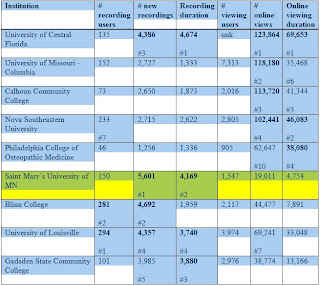
SMU acknowledged for its growth with lecture capture technology.
Tegrity, a leading class capture web service provider for higher education, acknowledged Saint Mary’s University at its 4th Annual User Conference held in Louisville KY. During the April 15th Tegrity Innovation Awards Ceremony, held at the Muhammad Ali Center in downtown Louisville, Saint Mary's University of Minnesota was awarded a Certificate of Achievement for its growth in the number and duration of new recordings during the past year.
Top Tegrity Users - Certificates of Achievement:
Usage statistics from 7/1/09 thru 4/10/10 (8+ months
Top Tegrity Users - Certificates of Achievement:
Usage statistics from 7/1/09 thru 4/10/10 (8+ months

Archiving Blackboard Courses
Directions for Archiving Courses are located at here.
Once you've archived and saved the resulting file for your courses you may request that the HelpDesk delete the courses permanently from the Blackboard system.
ATTENTION: ONCE Courses are deleted they may not be restored.
To request that courses be removed from the Blackboard system please email the HelpDesk with a listing of the course IDs that should be removed and your verification that you've archived the content you want to have record of.
Once you've archived and saved the resulting file for your courses you may request that the HelpDesk delete the courses permanently from the Blackboard system.
ATTENTION: ONCE Courses are deleted they may not be restored.
To request that courses be removed from the Blackboard system please email the HelpDesk with a listing of the course IDs that should be removed and your verification that you've archived the content you want to have record of.
Computer maintenance over the summer
Don't forget to keep your computer up to date over the summer. This includes Windows Updates and Virus software updates.
Thursday, May 6, 2010

Windows 7 in Hendrickson Labs
Windows 7 has been installed in all Hendrickson Labs. Come down and test the software that you will need for your classes next year.
Amnesty Day for the Pro Presenter
If you have acquired or come into the possession of a Power Point clicker (Pro Presenter), we will have a period of amnesty for the return of these items. Please, if you have one, drop the Pro Presenter off at the Helpdesk anytime. These are invaluable, costly to replace, & would help out the pocketbook budget. Thank you for your support.
Friday, April 16, 2010
Getting around with the arrow keys

After the focus is in the Ribbon, you can move around by using the arrow keys.
There's another way of using sequential keystrokes to move around the Ribbon. First, you must press the ALT key, just like with Key Tips, to move the focus from the document to the Ribbon. Then you can move around by using the arrow keys.
• The LEFT ARROW and RIGHT ARROW keys move you to the adjacent tabs.
• The UP ARROW key moves the focus to the Quick Access Toolbar. (From there, use the LEFT ARROW key to move to the Microsoft Office Button.)
• The DOWN ARROW key moves you into the active tab, where you can move further using the other arrow keys.
The major improvement over previous versions of Microsoft Office in moving around the screen with the arrow keys is that you can use them to move up and down as well as side to side.
You'll get to see exactly how you can move around in the Ribbon in the practice session. Navigating around like this is a great way to get to know the Ribbon.
Tip Once you start moving around the Ribbon like this, the Key Tip badges disappear. Get them back by pressing ALT twice.
Subscribe to:
Posts (Atom)
